


Imagine landing on a website, and instead of being overwhelmed by too much content at once, you’re smoothly guided through it, one captivating slide at a time. That’s the power of carousels. These sliders have become a design favorite and elegantly display key content like products or blog posts without overwhelming visitors.
Carrousels zijn er in vele vormen: sommige markeren productkenmerken in een eCommerce omgeving, andere tonen afbeeldingengalerijen of cureren posts dynamisch. Of je nu een kleine ondernemer bent die zijn best verkopende artikelen onder de aandacht wil brengen of een blogger die zijn laatste posts organiseert, carrousels bieden een schone, efficiënte oplossing voor het organiseren van content.
Whether you’re looking to increase engagement, drive sales, or improve your site’s design, choosing the right carousel plugin can make all the difference. Here’s a quick comparison to help you choose.
|
Plugins |
Standaard functies |
Prijs |
|---|---|---|
|
Sliderberg |
Block-based plugin. Slide anything. |
Free, Pro $49 once |
|
Galerijberg |
Gutenberg gallery block. Carousel layout for images. |
Free, Pro from $29/year |
|
Soliloquy |
Drag-and-drop builder. Instagram and PDF imports. |
Free, carousel needs Developer plan |
|
MetaSlider |
Supports image and video carousels. SEO optimization. |
Free, Pro from $79/year |
|
WP Carrousel |
Watermarking and image protection. Touch-friendly. |
Free, Pro from $39/year |
|
Slimme schuif 3 |
Layer-based editor. Custom breakpoints. |
Free, Pro from $49 once |
|
Schuifregelaar Revolutie |
Add-ons voor 3D-effecten, particles en meer. |
Free, Premium from $45/year |
|
Slider & Popup-bouwer door Depicter |
AI-powered builder. Parallax effects and scheduling. |
Free, Pro from $49/year |
|
Carrousel schuifregelaar |
Image, video, and product carousels. Lazy loading. |
Gratis |
Laten we verder gaan met hun details.
Sliderberg

Onze lijst begint met Sliderberg, a modern block-based carousel plugin designed specifically for the WordPress Block Editor. Its strength lies in its versatility. Sliderberg lets you turn virtually any content into an engaging carousel or slider, making it perfect for showcasing products, posts, images, and even mixed content blocks seamlessly.
Met Sliderberg zijn er geen ingewikkelde instellingen of uitgebreide coderingen nodig. Voeg gewoon uw blokken direct toe aan de slider, pas de overgangen aan en kijk hoe uw inhoud elegant over de schermen glijdt. Het intuïtieve ontwerp zorgt ervoor dat je carrousels volledig responsief zijn, voor een optimale kijkervaring op alle apparaten. Of u nu een beginner of een ervaren ontwerper bent, Sliderberg maakt het maken van stijlvolle carrousels eenvoudig en plezierig.
Editor-interface

Topfuncties
- Op blokken gebaseerde carrouselbouwer die compatibel is met Gutenberg.
- Ondersteunt verschillende inhoudstypen: afbeeldingen, tekst, video's en alle kernblokken.
- Three transitions (slide, fade, zoom) with five easing curves.
- Twelve arrow positions, six dot positions, plus a free-position mode.
- Volledig responsief en geoptimaliseerd voor mobiele weergave.
- Snel te laden en lichtgewicht, voor uitstekende prestaties.
Prijs
Sliderberg is free from the WordPress repository, and the free version covers everything most sites need. Sliderberg PRO costs $49 as a one-time payment for unlimited sites, and it adds Coverflow 3D transitions, vertical sliders, and fraction pagination.
Galerijberg

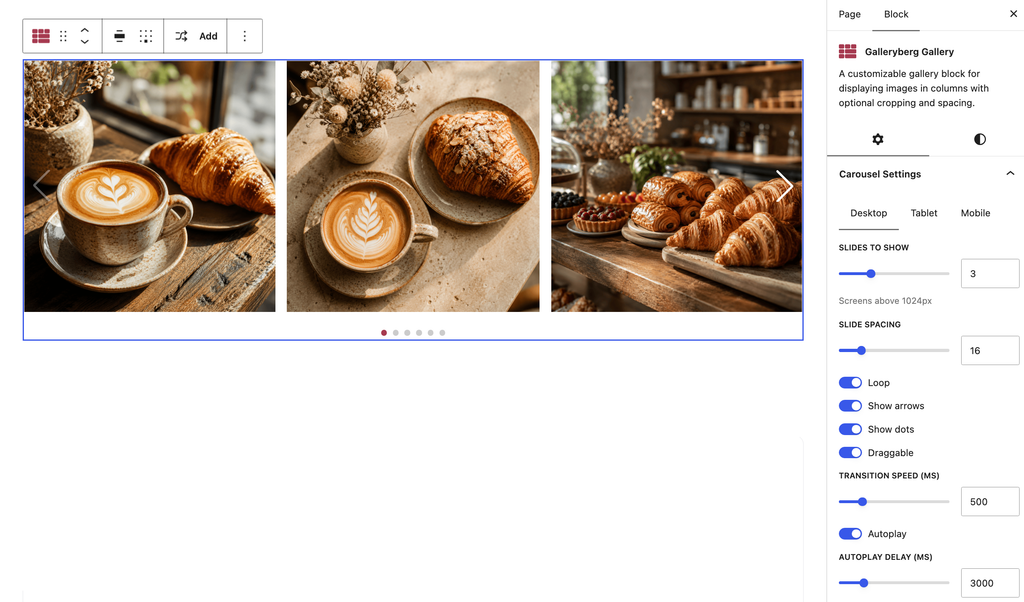
De volgende is Galerijberg, a gallery block plugin for the WordPress Block Editor that recently added a Carousel layout. If your carousel is mostly about photos rather than full page sections, this is the simplest route on the list.
The way it works is refreshingly plain. You add a Galleryberg Gallery block, drop in your images the same way you would with the default gallery, then switch the layout dropdown from grid to Carousel. That’s the entire setup. There is no separate slider builder to learn, no shortcode to paste, and no admin screen to visit. Everything happens inside the post or page you are already editing.
Under the hood the carousel is built on Swiper, one of the most widely used slider libraries on the web, so touch swiping, keyboard arrows, and mobile behavior all work the way visitors already expect. Captions still show, and clicking an image still opens the lightbox, so nothing you already set up stops working when you switch layouts.
There’s also a Randomize image order option, which reshuffles your images on every page load. It runs in the visitor’s browser rather than on the server, so it keeps shuffling even with a caching plugin turned on. That one is available in the free version.
Topfuncties
- Carousel layout built directly into the Gutenberg gallery block.
- Separate control over how many images show on desktop, tablet, and mobile.
- Adjustable gap between images, navigation arrows, and pagination dots.
- Autoplay with adjustable timing per slide.
- Built-in responsive lightbox with captions and touch support.
- Randomize image order that keeps working with caching enabled.
- Mosaic layout and lightbox thumbnails for non-carousel galleries.
Prijs
Galleryberg is free on WordPress.org. The Carousel layout is a Pro feature, and Pro starts at $29 per year for a single site or $49 per year for unlimited sites. Lifetime licenses are $89 for a single site and $149 for unlimited sites, with a 30-day money-back guarantee.
Soliloquy

Soliloquy is an all-in-one solution for creating responsive sliders and carousels that will catch the eyes of your visitors within seconds. Its intuitive drag-and-drop builder allows you to quickly adapt to creating both simple and dynamic carousels to suit your needs. The free Lite version is used on more than 30,000 sites.
The plugin’s primary goal is to offer a straightforward solution for creating responsive and visually attractive sliders and carousels on WordPress websites. It simplifies the process of building image, video, and product sliders through an intuitive drag-and-drop interface, and it keeps the results optimized for speed, SEO, and mobile devices. It supports a variety of use cases, from simple image sliders to more complex carousels, including WooCommerce product displays, fullscreen lightbox slideshows, and dynamic content like blog posts and Instagram feeds.
If we move to the exact carousel feature in Soliloquy, we’ll see its focus on providing flexibility with a fully responsive design. With the plugin, you can quickly reorder images to fix their position and adjust item widths, margins, and the number of items to move per animation. On top of these features, you’ll be able to add captions, link images, and even insert videos in your slider to improve the overall presentation.

Topfuncties
- Bouw sliders met slepen en neerzetten.
- Volledig responsief.
- Supports WooCommerce product sliders.
- Instagram en PDF import.
- Aanpasbare itembreedtes, marges en animaties.
- Ondersteunt bijschriften, afbeeldingen koppelen en video-integratie.
- Point-and-click bediening voor eenvoudige installatie.
Prijs:
Soliloquy has a free version, but the carousel comes as a paid add-on. You’ll need the Developer plan, which lists at $199 per year and is frequently discounted to around $99.50. The cheaper Personal and Multi plans do not include the Carousel add-on, so check the plan comparison before buying.
MetaSlider

Vervolgens gaan we naar MetaSlider, another well-known plugin for creating responsive sliders, carousels, and galleries with ease. With more than 500,000 active installs, its drag-and-drop interface makes it a go-to choice for anyone who wants to build professional-looking sliders and carousels for their website.
MetaSlider provides a flexible and easy-to-use solution for creating responsive sliders, carousels, galleries, and slideshows. It supports a wide range of content types, including images, videos, posts, and WooCommerce products. The plugin integrates with WordPress’s media library and lets you customize slides with captions, links, and SEO fields. You may seek help from the custom theme option to tweak navigation, captions, and layout so that the carousel fits perfectly with your site’s design. MetaSlider is also optimized for speed and performance by integrating with the WordPress Block Editor and various page builders.
Carousel mode itself works in the free version with image slides. The extra slide types, including YouTube, Vimeo, TikTok, local videos, layers, WooCommerce products, and post feeds, come with MetaSlider Slideshow Pro. The best use of this carousel is for showcasing your latest posts or creating a “Featured Product” display for your homepage.

Topfuncties
- Drag-and-drop interface voor eenvoudige installatie.
- Volledig responsief.
- Ondersteunt afbeeldingen, video's, berichten en WooCommerce producten.
- Aanpasbare itembreedtes, marges en overgangen voor carrousels.
- SEO optimalisatie met titel- en alt-tekstvelden.
- Aangepaste thema-opties voor navigatie, bijschriften en lay-out.
- Werkt met YouTube, Vimeo, TikTok en lokale video's.
Prijs
A free version is available. MetaSlider Slideshow Pro lists at $79 per year for a single site, $99 for five sites, and $199 for unlimited sites, and these are regularly offered at half price.
WP Carrousel

Vervolgens hebben we WP Carrouselis een krachtige maar gebruiksvriendelijke plugin die is ontworpen om prachtige carrousels te maken met afbeeldingen, berichten en WooCommerce producten. Hiermee kun je afbeeldingen selecteren uit je WordPress mediabibliotheek, ze naar hun plaats slepen en aanpassen om professionele carrousels te maken zonder enige hulp.
WP Carrousel ondersteunt verschillende carrousel types en elk type heeft zijn eigen set functies. Met de Image Carousel kun je prachtige galerijen maken met drag-and-drop functionaliteit, terwijl je met de Post Carousel berichten kunt weergeven met titels, uittreksels en meer. Je kunt ook productcarrousels maken om productnamen, afbeeldingen, prijzen en beoordelingen weer te geven, of je kunt zelfs videocarrousels maken met ondersteuning voor YouTube, Vimeo en zelfgehoste video's. Elk type is volledig responsief en aanpasbaar voor een soepele werking.
With WP Carousel’s flexibility, you can display images of different heights and set specific carousel behaviors like autoplay, infinite looping, and touch or swipe functionality. The plugin also features watermarking, carousel scheduling, multiple pagination types, and hundreds of visual customization options to create visually appealing and functional carousels.

Topfuncties
- Drag-and-drop interface voor het bouwen van carrousels.
- Ondersteunt afbeeldingen, berichten, pagina's, taxonomieën, WooCommerce producten en video's.
- Volledig responsief en aanraakvriendelijk.
- Oneindige looping en autoplay-besturingselementen.
- Geavanceerde styling en kleuraanpassing.
- Meerdere carrousels op dezelfde pagina.
- Optie voor lui laden.
- Lightbox-integratie met aangepaste videominiaturen.
- Opties voor watermerken en beeldbeveiliging.
- Planning en wachtwoordbeveiliging.
- Filter en bestel specifieke inhoud.
Prijs
Available in both free and pro versions. WP Carousel Pro starts at $39 per year for a single site, with a lifetime option at $139 once for a single site.
Slimme schuif 3

Slimme schuif 3 is a powerful, flexible plugin that lets you create responsive sliders, carousels, and full-width slideshows with ease. It’s one of the most widely used sliders on WordPress, with around 800,000 active installs, and it features a fully responsive, drag-and-drop slider builder.
Smart Slider 3 heeft een live dia-editor zodat je eenvoudig lay-outs kunt bouwen met lagen zoals tekst, afbeeldingen, knoppen en video's. De plugin wordt geleverd met vooraf ontworpen slider sjablonen en ondersteunt geavanceerde functies zoals laag animaties, een live animatie tijdlijn, lightbox integratie, dynamische dia generatoren en gedetailleerde aanpassingsopties voor volledige controle over elk element van je slider.
The carousel slider in Smart Slider 3 supports multiple slides side by side with customizable widths, slide distances, dynamic animations, and responsive resizing for mobile devices. It’s ideal for showcasing posts or products, with flexible design options that include text, images, buttons, and video layers.

Topfuncties
- Bouwer met slepen en neerzetten.
- Live voorbeschouwing.
- Vooraf ontworpen sjablonen en geavanceerde aanpassingsopties.
- Op lagen gebaseerde editor met ondersteuning voor tekst, afbeeldingen, knoppen en video's.
- Dynamische diageneratoren voor berichten en aangepaste inhoud.
- Lightbox-integratie en laaganimaties.
- Aanpasbare carrousel slider met instelbare breedtes en animaties.
- WooCommerce integratie.
- Custom breakpoints to fine-tune responsiveness.
Prijs
This plugin has both free and pro versions. The Carousel slider type is only available in Pro. Pricing is a one-time payment rather than a subscription: $49 for the Standard plan covering one site, or $99 for the Premium plan covering three, five, or ten sites. Both include lifetime updates and support.
Schuifregelaar Revolutie

We gaan nu naar Schuifregelaar Revolutie, a powerful plugin that makes building responsive and dynamic carousels effortless. Using its no-code visual editor, you can create image and post carousels that adapt to any screen size, with pre-made templates that simplify the process.
Slider Revolution’s carousel feature offers full control over visible slides, rotation, and animations. You can place layers freely, customize each slide, and even animate elements with keyframe support. Navigation options like arrows, bullets, and thumbnails enhance user interaction, while the drag-and-drop editor ensures intuitive design control.
With add-ons for advanced effects such as 3D spins, particles, and morphs, Slider Revolution lets you push the boundaries of what’s possible in carousel design. It seamlessly integrates with any WordPress theme, making it ideal for building high-impact carousels anywhere on your site.

Topfuncties
- Visuele no-code editor voor carrousels.
- Volledige controle over lay-out, rotatie en animaties.
- Ondersteunt keyframe-animaties en geavanceerde interacties.
- Add-ons voor 3D-effecten, particles en meer.
- Over 200 premium templates and a large elements library.
- Naadloze integratie met elk WordPress-thema.
Prijs
There’s a free version with the visual editor and core features. Premium is now sold as a yearly subscription rather than a one-time license, starting at $45 per year for a single site, $89 per year for three sites, and $209 per year for the agency-focused Scale plan. Templates, add-ons, and the elements library are all Premium features.
Slider & Popup-bouwer door Depicter

Slider & Popup-bouwer door Depicter is een veelzijdige plugin die schuifbalken, carrousels en pop-ups combineert in één krachtige tool voor WordPress gebruikers. Met een professionele visuele builder kun je eenvoudig schuifbalken, meldingsbalken, carrousels en zelfs heldensecties maken.
The plugin’s carousel feature offers fully responsive layouts, touch-enabled navigation, and animations. You can create dynamic carousels using posts, WooCommerce products, or custom content, with options for video backgrounds, parallax effects, and scheduling.
Depicter’s asset optimization ensures fast loading, with built-in lazy loading, WebP images, and dynamic content generation. You can also schedule sliders or carousels for specific times, ensuring they appear when they’re most relevant.

Topfuncties
- AI-assisted builder for sliders, carousels, and popups.
- Volledig responsief, SEO-vriendelijk en lichtgewicht.
- Ondersteunt parallaxeffecten en video-achtergronden.
- Geavanceerde navigatieopties (pijlen, opsommingstekens, aanraakbewegingen).
- Dynamische post- en productcarrousels.
- Planning voor schuifbalken en carrousels.
Prijs
The free version includes a basic slider builder and 146 templates, but the carousel builder is a paid feature. The Starter plan lists at $49 per year for one site and is often discounted to $39, with the Freelancer plan at $99 per year for three sites and Agency plans above that.
Carrousel schuifregelaar

The last on our list, Carousel Slider is a touch-enabled WordPress plugin designed to create responsive and customizable carousels. Whether you’re looking to showcase images, posts, WooCommerce products, or videos, this plugin provides all the tools needed to build engaging carousels without compromising on style or performance.
Met meerdere carrousel types ondersteunt Carousel Slider alles van media galerijen en video sliders tot WooCommerce product carrousels. Dankzij de flexibiliteit kun je de weergave-items aanpassen voor verschillende apparaten, de navigatie aanpassen en lui laden toepassen voor snelle prestaties.
Met volledige controle over navigatie, paginering en lay-out kun je heel eenvoudig meerdere carrousels op dezelfde pagina bouwen. Carousel Slider maakt ook video-integratie van YouTube en Vimeo mogelijk en ondersteunt aangepaste posts, waardoor het een alles-in-één oplossing is voor creatieve, interactieve carrousels.

Topfuncties
- Ondersteunt afbeeldingen, video's, berichten en WooCommerce productcarrousels.
- Hero slider with background image, title, description, and call-to-action buttons.
- Volledig responsief met touch-enabled navigatie.
- Integreert met Elementor, Divi en Gutenberg.
- Opties voor lui laden, CSS3 3D-versnelling en meerdere carrousels per pagina.
- Aanpasbare navigatie en kleuropties voor volledige controle over het ontwerp.
Prijs
Completely free. It’s used on roughly 30,000 sites and holds a 4.3-star rating on WordPress.org.
Essentiële functies van een goede WordPress Carrousel Plugin
Als je wilt uitzoeken hoe je een perfecte carrousel plugin kunt kiezen, dan kunnen deze aspecten je helpen.
- Dynamische integratie van inhoud: Met een geweldige plugin kun je dynamische inhoud zoals berichten, WooCommerce-producten of testimonials automatisch binnenhalen, zodat je sliders fris blijven zonder dat je ze handmatig hoeft bij te werken.
- Animaties in lagen: Met plugins die gelaagde animatiebesturing bieden, kun je geavanceerde, gelaagde visuele effecten maken voor meer creatieve vrijheid.
- Lazy Loading en optimalisatie: Een sterke slider-plugin moet functies voor lui laden en mediaoptimalisatie bieden om ervoor te zorgen dat je afbeeldingen snel laden zonder de snelheid van de site te beïnvloeden.
- Ondersteuning voor aanraken en gebaren: Met mobiel verkeer dat zo cruciaal is, zal een slider plugin die feilloze ondersteuning biedt voor aanraken en gebaren op mobiele apparaten de gebruikerservaring aanzienlijk verbeteren.
- Multimedia-ondersteuning: Not just images. High-quality slider plugins should support videos from YouTube, Vimeo, or self-hosted sources.
- Active Maintenance: Check when the plugin was last updated. Sliders sit on your most visible pages, and an abandoned or closed plugin becomes a security risk rather than a design feature.
Veelgestelde vragen
What is the difference between a slider and a carousel?
A slider shows one item at a time and replaces it with the next. A carousel shows several items side by side and moves them along as a row. Most plugins on this list can do both, and the setting is usually called something like “slides to show” or “items per view.”
Which carousel plugin is best for the block editor?
If you want to slide full page sections such as headings, buttons, and columns, Sliderberg is the natural fit because each slide is just a container for regular blocks. If your carousel is a set of photos, Galleryberg is simpler, since you switch an existing gallery to the Carousel layout instead of building a slider from scratch.
Do carousel plugins slow down a website?
They can, depending on how they’re built. Heavier plugins load large scripts and template libraries on every page. Lighter, block-based plugins tend to load their assets only on pages where the carousel actually appears. Lazy loading matters too, since it stops off-screen images from loading until a visitor scrolls to them.
Can I get a carousel for free?
Yes. Carousel Slider is entirely free, and MetaSlider, Sliderberg, and WP Carousel all include working carousels in their free versions. Some plugins reserve carousel mode for their paid version, including Smart Slider 3, Galleryberg, Depicter, and Soliloquy.
How many images should a carousel hold?
Fewer than you might expect. Most visitors only see the first slide or two, so put your best content first and keep the set short enough that someone would plausibly reach the end. Long carousels are usually better served by a grid or a masonry gallery.
Are carousels bad for SEO?
Not on their own. Problems come from carousels that load slowly, hide important text behind slides that auto-advance too fast, or ship images without alt text. Choose a lightweight plugin, keep autoplay timing generous, and fill in your alt text, and a carousel won’t hurt your rankings.
Conclusie
Carousels offer more than just a visual display. They provide a way to keep visitors engaged and guide them through your content smoothly. With the right plugin, you can present your posts, products, or images in a sleek, organized format that improves the browsing experience. Now that you’ve seen the top plugins, it’s time to pick the one that best suits your website’s goals and start creating dynamic, interactive content.
