


Imagine landing on a website, and instead of being overwhelmed by too much content at once, you’re smoothly guided through it, one captivating slide at a time. That’s the power of carousels. These sliders have become a design favorite and elegantly display key content like products or blog posts without overwhelming visitors.
Os carrosséis são apresentados de várias formas: alguns destacam recursos de produtos em um ambiente de comércio eletrônico, outros exibem galerias de imagens ou selecionam posts dinamicamente. Quer você seja proprietário de uma pequena empresa tentando destacar seus itens mais vendidos ou um blogueiro organizando suas últimas postagens, os carrosséis oferecem uma solução limpa e eficiente para organizar o conteúdo.
Whether you’re looking to increase engagement, drive sales, or improve your site’s design, choosing the right carousel plugin can make all the difference. Here’s a quick comparison to help you choose.
|
Plugins |
Recursos padrão |
Preço |
|---|---|---|
|
Sliderberg |
Block-based plugin. Slide anything. |
Free, Pro $49 once |
|
Galleryberg |
Gutenberg gallery block. Carousel layout for images. |
Free, Pro from $29/year |
|
Solilóquio |
Drag-and-drop builder. Instagram and PDF imports. |
Free, carousel needs Developer plan |
|
MetaSlider |
Supports image and video carousels. SEO optimization. |
Free, Pro from $79/year |
|
WP Carrossel |
Watermarking and image protection. Touch-friendly. |
Free, Pro from $39/year |
|
Controle deslizante inteligente 3 |
Layer-based editor. Custom breakpoints. |
Free, Pro from $49 once |
|
Revolução do controle deslizante |
Complementos para efeitos 3D, partículas e muito mais. |
Free, Premium from $45/year |
|
Slider & Popup Builder by Depicter |
AI-powered builder. Parallax effects and scheduling. |
Free, Pro from $49/year |
|
Controle deslizante de carrossel |
Image, video, and product carousels. Lazy loading. |
Grátis |
Vamos passar para os detalhes.
Sliderberg

Para começar nossa lista, temos Sliderberg, a modern block-based carousel plugin designed specifically for the WordPress Block Editor. Its strength lies in its versatility. Sliderberg lets you turn virtually any content into an engaging carousel or slider, making it perfect for showcasing products, posts, images, and even mixed content blocks seamlessly.
Com o Sliderberg, não há necessidade de configurações complicadas ou codificação extensa. Basta adicionar os blocos diretamente ao controle deslizante, personalizar as transições e observar como o conteúdo desliza elegantemente pelas telas. O design intuitivo garante que seus carrosséis sejam totalmente responsivos, proporcionando uma experiência de visualização ideal em todos os dispositivos. Quer você seja um iniciante ou um designer experiente, o Sliderberg torna a criação de carrosséis elegantes simples e agradável.
Interface do editor

Principais recursos
- Criador de carrossel baseado em blocos compatível com o Gutenberg.
- Oferece suporte a diversos tipos de conteúdo: imagens, texto, vídeos e todos os blocos principais.
- Three transitions (slide, fade, zoom) with five easing curves.
- Twelve arrow positions, six dot positions, plus a free-position mode.
- Totalmente responsivo e otimizado para visualização em dispositivos móveis.
- Carregamento rápido e leve, garantindo excelente desempenho.
Preço
Sliderberg is free from the WordPress repository, and the free version covers everything most sites need. Sliderberg PRO costs $49 as a one-time payment for unlimited sites, and it adds Coverflow 3D transitions, vertical sliders, and fraction pagination.
Galleryberg

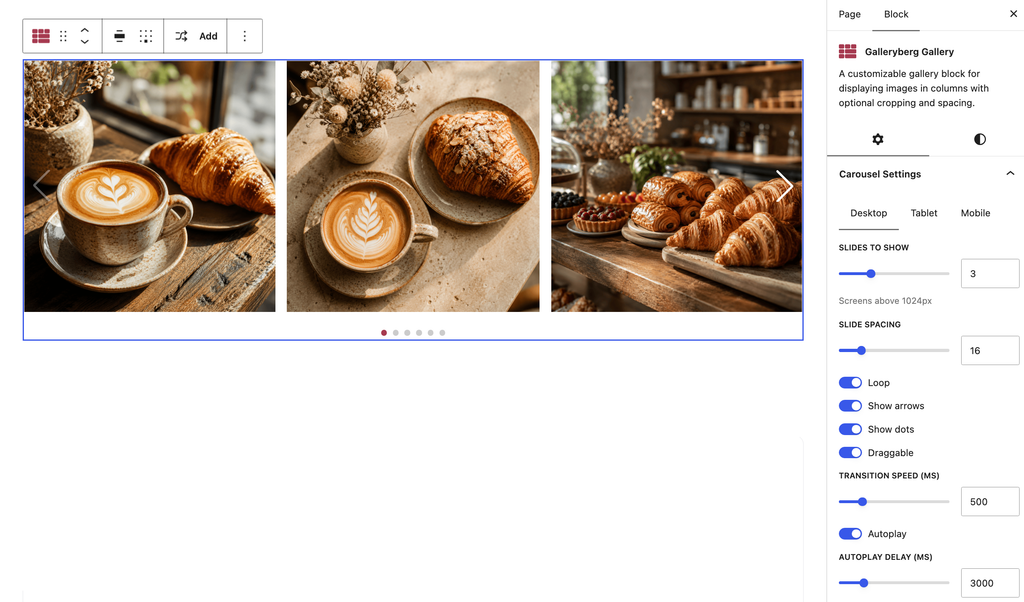
O próximo é Galleryberg, a gallery block plugin for the WordPress Block Editor that recently added a Carousel layout. If your carousel is mostly about photos rather than full page sections, this is the simplest route on the list.
The way it works is refreshingly plain. You add a Galleryberg Gallery block, drop in your images the same way you would with the default gallery, then switch the layout dropdown from grid to Carousel. That’s the entire setup. There is no separate slider builder to learn, no shortcode to paste, and no admin screen to visit. Everything happens inside the post or page you are already editing.
Under the hood the carousel is built on Swiper, one of the most widely used slider libraries on the web, so touch swiping, keyboard arrows, and mobile behavior all work the way visitors already expect. Captions still show, and clicking an image still opens the lightbox, so nothing you already set up stops working when you switch layouts.
There’s also a Randomize image order option, which reshuffles your images on every page load. It runs in the visitor’s browser rather than on the server, so it keeps shuffling even with a caching plugin turned on. That one is available in the free version.
Principais recursos
- Carousel layout built directly into the Gutenberg gallery block.
- Separate control over how many images show on desktop, tablet, and mobile.
- Adjustable gap between images, navigation arrows, and pagination dots.
- Autoplay with adjustable timing per slide.
- Built-in responsive lightbox with captions and touch support.
- Randomize image order that keeps working with caching enabled.
- Mosaic layout and lightbox thumbnails for non-carousel galleries.
Preço
Galleryberg is free on WordPress.org. The Carousel layout is a Pro feature, and Pro starts at $29 per year for a single site or $49 per year for unlimited sites. Lifetime licenses are $89 for a single site and $149 for unlimited sites, with a 30-day money-back guarantee.
Solilóquio

Solilóquio is an all-in-one solution for creating responsive sliders and carousels that will catch the eyes of your visitors within seconds. Its intuitive drag-and-drop builder allows you to quickly adapt to creating both simple and dynamic carousels to suit your needs. The free Lite version is used on more than 30,000 sites.
The plugin’s primary goal is to offer a straightforward solution for creating responsive and visually attractive sliders and carousels on WordPress websites. It simplifies the process of building image, video, and product sliders through an intuitive drag-and-drop interface, and it keeps the results optimized for speed, SEO, and mobile devices. It supports a variety of use cases, from simple image sliders to more complex carousels, including WooCommerce product displays, fullscreen lightbox slideshows, and dynamic content like blog posts and Instagram feeds.
If we move to the exact carousel feature in Soliloquy, we’ll see its focus on providing flexibility with a fully responsive design. With the plugin, you can quickly reorder images to fix their position and adjust item widths, margins, and the number of items to move per animation. On top of these features, you’ll be able to add captions, link images, and even insert videos in your slider to improve the overall presentation.

Principais recursos
- Criador de controle deslizante de arrastar e soltar.
- Totalmente responsivo.
- Supports WooCommerce product sliders.
- Importação de Instagram e PDF.
- Larguras, margens e animações de itens personalizáveis.
- Oferece suporte a legendas, vinculação de imagens e integração de vídeo.
- Controles do tipo apontar e clicar para facilitar a configuração.
Preço:
Soliloquy has a free version, but the carousel comes as a paid add-on. You’ll need the Developer plan, which lists at $199 per year and is frequently discounted to around $99.50. The cheaper Personal and Multi plans do not include the Carousel add-on, so check the plan comparison before buying.
MetaSlider

Em seguida, passamos para MetaSlider, another well-known plugin for creating responsive sliders, carousels, and galleries with ease. With more than 500,000 active installs, its drag-and-drop interface makes it a go-to choice for anyone who wants to build professional-looking sliders and carousels for their website.
MetaSlider provides a flexible and easy-to-use solution for creating responsive sliders, carousels, galleries, and slideshows. It supports a wide range of content types, including images, videos, posts, and WooCommerce products. The plugin integrates with WordPress’s media library and lets you customize slides with captions, links, and SEO fields. You may seek help from the custom theme option to tweak navigation, captions, and layout so that the carousel fits perfectly with your site’s design. MetaSlider is also optimized for speed and performance by integrating with the WordPress Block Editor and various page builders.
Carousel mode itself works in the free version with image slides. The extra slide types, including YouTube, Vimeo, TikTok, local videos, layers, WooCommerce products, and post feeds, come with MetaSlider Slideshow Pro. The best use of this carousel is for showcasing your latest posts or creating a “Featured Product” display for your homepage.

Principais recursos
- Interface de arrastar e soltar para facilitar a configuração.
- Totalmente responsivo.
- Oferece suporte a imagens, vídeos, publicações e produtos do WooCommerce.
- Larguras de itens, margens e transições personalizáveis para carrosséis.
- Otimização de SEO com campos de título e texto alternativo.
- Opções de tema personalizadas para navegação, legendas e layout.
- Funciona com o YouTube, Vimeo, TikTok e vídeos locais.
Preço
A free version is available. MetaSlider Slideshow Pro lists at $79 per year for a single site, $99 for five sites, and $199 for unlimited sites, and these are regularly offered at half price.
WP Carrossel

Em seguida, temos WP CarrosselO WooCommerce é um plugin poderoso e fácil de usar, projetado para criar belos carrosséis com imagens, posts e produtos do WooCommerce. Ele permite selecionar imagens da biblioteca de mídia do WordPress, arrastá-las e soltá-las no lugar e personalizá-las para criar carrosséis profissionais sem qualquer ajuda.
O WP Carousel oferece suporte a diferentes tipos de carrossel, e cada tipo vem com seu próprio conjunto de recursos. O Image Carousel permite criar belas galerias com a funcionalidade de arrastar e soltar, enquanto o Post Carousel permite exibir posts com títulos, trechos e muito mais. Você também pode criar carrosséis de produtos para mostrar nomes de produtos, imagens, preços e classificações, ou pode até mesmo criar carrosséis de vídeo com suporte para YouTube, Vimeo e vídeos auto-hospedados. Cada tipo é totalmente responsivo e personalizável para garantir um desempenho geral suave.
With WP Carousel’s flexibility, you can display images of different heights and set specific carousel behaviors like autoplay, infinite looping, and touch or swipe functionality. The plugin also features watermarking, carousel scheduling, multiple pagination types, and hundreds of visual customization options to create visually appealing and functional carousels.

Principais recursos
- Interface de arrastar e soltar para criar carrosséis.
- Oferece suporte a imagens, posts, páginas, taxonomia, produtos do WooCommerce e vídeos.
- Totalmente responsivo e sensível ao toque.
- Controles de looping infinito e reprodução automática.
- Personalização avançada de estilos e cores.
- Vários carrosséis na mesma página.
- Opção de carregamento preguiçoso.
- Integração do Lightbox com miniaturas de vídeo personalizadas.
- Opções de marca d'água e proteção de imagem.
- Agendamento e proteção por senha.
- Filtrar e solicitar conteúdo específico.
Preço
Available in both free and pro versions. WP Carousel Pro starts at $39 per year for a single site, with a lifetime option at $139 once for a single site.
Controle deslizante inteligente 3

Controle deslizante inteligente 3 is a powerful, flexible plugin that lets you create responsive sliders, carousels, and full-width slideshows with ease. It’s one of the most widely used sliders on WordPress, with around 800,000 active installs, and it features a fully responsive, drag-and-drop slider builder.
O Smart Slider 3 apresenta um editor de slides ao vivo para que você possa criar layouts facilmente usando camadas como texto, imagens, botões e vídeos. O plug-in é fornecido com modelos de controle deslizante pré-projetados e oferece suporte a recursos avançados, como animações em camadas, uma linha do tempo de animação ao vivo, integração com lightbox, geradores de slides dinâmicos e opções de personalização detalhadas para controle total sobre cada elemento do controle deslizante.
The carousel slider in Smart Slider 3 supports multiple slides side by side with customizable widths, slide distances, dynamic animations, and responsive resizing for mobile devices. It’s ideal for showcasing posts or products, with flexible design options that include text, images, buttons, and video layers.

Principais recursos
- Construtor de arrastar e soltar.
- Prévia ao vivo.
- Modelos predefinidos e opções avançadas de personalização.
- Editor baseado em camadas com suporte para texto, imagens, botões e vídeos.
- Geradores de slides dinâmicos para posts e conteúdo personalizado.
- Integração com lightbox e animações em camadas.
- Controle deslizante de carrossel personalizável com larguras e animações ajustáveis.
- Integração com o WooCommerce.
- Custom breakpoints to fine-tune responsiveness.
Preço
This plugin has both free and pro versions. The Carousel slider type is only available in Pro. Pricing is a one-time payment rather than a subscription: $49 for the Standard plan covering one site, or $99 for the Premium plan covering three, five, or ten sites. Both include lifetime updates and support.
Revolução do controle deslizante

Passamos agora para Revolução do controle deslizante, a powerful plugin that makes building responsive and dynamic carousels effortless. Using its no-code visual editor, you can create image and post carousels that adapt to any screen size, with pre-made templates that simplify the process.
Slider Revolution’s carousel feature offers full control over visible slides, rotation, and animations. You can place layers freely, customize each slide, and even animate elements with keyframe support. Navigation options like arrows, bullets, and thumbnails enhance user interaction, while the drag-and-drop editor ensures intuitive design control.
With add-ons for advanced effects such as 3D spins, particles, and morphs, Slider Revolution lets you push the boundaries of what’s possible in carousel design. It seamlessly integrates with any WordPress theme, making it ideal for building high-impact carousels anywhere on your site.

Principais recursos
- Editor visual sem código para carrosséis.
- Controle total sobre o layout, a rotação e as animações.
- Oferece suporte a animações de quadro-chave e interações avançadas.
- Complementos para efeitos 3D, partículas e muito mais.
- Over 200 premium templates and a large elements library.
- Integração perfeita com qualquer tema do WordPress.
Preço
There’s a free version with the visual editor and core features. Premium is now sold as a yearly subscription rather than a one-time license, starting at $45 per year for a single site, $89 per year for three sites, and $209 per year for the agency-focused Scale plan. Templates, add-ons, and the elements library are all Premium features.
Slider & Popup Builder by Depicter

Slider & Popup Builder by Depicter é um plug-in versátil que combina controles deslizantes, carrosséis e pop-ups em uma ferramenta poderosa para usuários do WordPress. Com um construtor visual profissional, você pode criar facilmente controles deslizantes, barras de notificação, carrosséis e até mesmo seções de heróis.
The plugin’s carousel feature offers fully responsive layouts, touch-enabled navigation, and animations. You can create dynamic carousels using posts, WooCommerce products, or custom content, with options for video backgrounds, parallax effects, and scheduling.
Depicter’s asset optimization ensures fast loading, with built-in lazy loading, WebP images, and dynamic content generation. You can also schedule sliders or carousels for specific times, ensuring they appear when they’re most relevant.

Principais recursos
- AI-assisted builder for sliders, carousels, and popups.
- Totalmente responsivo, compatível com SEO e leve.
- Oferece suporte a efeitos de paralaxe e planos de fundo de vídeo.
- Opções avançadas de navegação (setas, marcadores, gestos de toque).
- Carrosséis dinâmicos de posts e produtos.
- Agendamento para controles deslizantes e carrosséis.
Preço
The free version includes a basic slider builder and 146 templates, but the carousel builder is a paid feature. The Starter plan lists at $49 per year for one site and is often discounted to $39, with the Freelancer plan at $99 per year for three sites and Agency plans above that.
Controle deslizante de carrossel

The last on our list, Carousel Slider is a touch-enabled WordPress plugin designed to create responsive and customizable carousels. Whether you’re looking to showcase images, posts, WooCommerce products, or videos, this plugin provides all the tools needed to build engaging carousels without compromising on style or performance.
Com vários tipos de carrossel, o Carousel Slider é compatível com tudo, desde galerias de mídia e controles deslizantes de vídeo até carrosséis de produtos do WooCommerce. Sua flexibilidade permite que você ajuste os itens de exibição para diferentes dispositivos, personalize a navegação e aplique o lazy loading para obter um desempenho rápido.
Com controle total sobre a navegação, a paginação e o layout, é possível criar vários carrosséis na mesma página com facilidade. O Carousel Slider também permite a integração de vídeos do YouTube e do Vimeo e oferece suporte a posts personalizados, tornando-o uma solução completa para carrosséis criativos e interativos.

Principais recursos
- Oferece suporte a carrosséis de imagens, vídeos, posts e produtos do WooCommerce.
- Hero slider with background image, title, description, and call-to-action buttons.
- Totalmente responsivo com navegação habilitada para toque.
- Integra-se com Elementor, Divi e Gutenberg.
- Opções para carregamento lento, aceleração 3D CSS3 e vários carrosséis por página.
- Navegação personalizável e opções de cores para controle total do design.
Preço
Completely free. It’s used on roughly 30,000 sites and holds a 4.3-star rating on WordPress.org.
Recursos essenciais de um ótimo plug-in de carrossel para WordPress
Se quiser descobrir como escolher um plugin de carrossel perfeito, esses aspectos devem ser úteis para você.
- Integração de conteúdo dinâmico: Um ótimo plug-in permite que você extraia conteúdo dinâmico, como publicações, produtos do WooCommerce ou depoimentos, automaticamente, mantendo seus controles deslizantes atualizados sem atualizações manuais.
- Animações em camadas: Os plug-ins que oferecem controles de animação em camadas permitem que você crie efeitos visuais sofisticados e com várias camadas para ter mais liberdade criativa.
- Carregamento lento e otimização: Um plug-in de controle deslizante forte deve oferecer recursos de carregamento lento e otimização de mídia para garantir que suas imagens sejam carregadas rapidamente sem afetar a velocidade do site.
- Suporte a toques e gestos: Como o tráfego móvel é muito importante, um plug-in de controle deslizante que ofereça suporte impecável a toques e gestos em dispositivos móveis melhorará significativamente a experiência do usuário.
- Suporte a multimídia: Not just images. High-quality slider plugins should support videos from YouTube, Vimeo, or self-hosted sources.
- Active Maintenance: Check when the plugin was last updated. Sliders sit on your most visible pages, and an abandoned or closed plugin becomes a security risk rather than a design feature.
Perguntas frequentes
What is the difference between a slider and a carousel?
A slider shows one item at a time and replaces it with the next. A carousel shows several items side by side and moves them along as a row. Most plugins on this list can do both, and the setting is usually called something like “slides to show” or “items per view.”
Which carousel plugin is best for the block editor?
If you want to slide full page sections such as headings, buttons, and columns, Sliderberg is the natural fit because each slide is just a container for regular blocks. If your carousel is a set of photos, Galleryberg is simpler, since you switch an existing gallery to the Carousel layout instead of building a slider from scratch.
Do carousel plugins slow down a website?
They can, depending on how they’re built. Heavier plugins load large scripts and template libraries on every page. Lighter, block-based plugins tend to load their assets only on pages where the carousel actually appears. Lazy loading matters too, since it stops off-screen images from loading until a visitor scrolls to them.
Can I get a carousel for free?
Yes. Carousel Slider is entirely free, and MetaSlider, Sliderberg, and WP Carousel all include working carousels in their free versions. Some plugins reserve carousel mode for their paid version, including Smart Slider 3, Galleryberg, Depicter, and Soliloquy.
How many images should a carousel hold?
Fewer than you might expect. Most visitors only see the first slide or two, so put your best content first and keep the set short enough that someone would plausibly reach the end. Long carousels are usually better served by a grid or a masonry gallery.
Are carousels bad for SEO?
Not on their own. Problems come from carousels that load slowly, hide important text behind slides that auto-advance too fast, or ship images without alt text. Choose a lightweight plugin, keep autoplay timing generous, and fill in your alt text, and a carousel won’t hurt your rankings.
Conclusão
Carousels offer more than just a visual display. They provide a way to keep visitors engaged and guide them through your content smoothly. With the right plugin, you can present your posts, products, or images in a sleek, organized format that improves the browsing experience. Now that you’ve seen the top plugins, it’s time to pick the one that best suits your website’s goals and start creating dynamic, interactive content.
