


Countdown timers have become an influencing element for creating urgency and driving website engagement. If you’re highlighting a sale, preparing for a product launch, or setting a deadline for an event, these timers will come to your aid to capture attention and encourage timely action.
The versatility of countdown timers makes them invaluable for e-commerce, promotional campaigns, and even blog countdowns for special occasions. But if you’re willing to add that feature to your website, plugins are a must.
Not all countdown plugins are created equal; some prioritize visually appealing designs, others specialize in advanced scheduling or recurring timers, and many focus on smooth integration with page builders or e-commerce platforms.
To help you navigate the choices, we’ve compiled a list of the best countdown timer plugins. Each plugin brings unique strengths to the table, and each will be a healthy addition to your WordPress collection. Let’s go straight to them.
Plugins |
Active Installations |
Key Features |
Download |
|---|---|---|---|
Ultimate Blocks |
50,000+ |
|
|
Thrive Ultimatum |
N/A |
|
|
Hurry Timer |
20,000+ |
|
|
Countdown Timer Ultimate |
20,000+ |
|
|
Countdown Builder |
10,000+ |
|
|
Element Pack Pro |
100,000+ |
|
|
Sales Countdown Timer |
6,000+ |
|
Ultimate Blocks
The frontliner in our list is Ultimate Blocks, a WordPress plugin designed to transform content creation for bloggers and marketers who aim to leave a lasting impression. With 26 versatile blocks, this plugin doesn’t just add features; it simplifies, transforms, and delivers interactive and visually captivating content.
Ultimate Blocks solidifies its position as the leader with its versatility and depth. At its heart is the Countdown Block, designed to create urgency with eye-catching regular, odometer, and circular styles. Whether you’re announcing an upcoming event or promoting a time-limited offer, this block ensures your message stands out. Users can personalize colors, control time unit displays, and align the timer’s look with their website’s branding. And you can’t just ignore the fact that you might be interested in only the countdown block; it has 25 more useful blocks waiting for utilization.
Ultimately, Ultimate Blocks is more than just a plugin; it’s your creative partner. The plugin enables you to create memorable and high-performing content with ease, which makes it a must-have for anyone serious about building an impactful online presence.

Top Features
- 26 versatile blocks for dynamic content.
- Limited for Gutenberg.
- Countdown Block has regular, odometer, and circular styles.
- Full customization of time units and colors.
- Blocks for calls to action, table of contents, social sharing, reviews, FAQs, and many more.
Price
Ultimate Blocks is available for free, with a pro version starting at $49.
Read Also: How to Add a Countdown Timer to Your WordPress Site
Thrive Ultimatum

The next name on our list is Thrive Ultimatum, a WordPress plugin that goes beyond traditional countdown timers. With a focus on scarcity marketing, Thrive Ultimatum combines urgency and authenticity to increase sales and conversions with time-sensitive offers.
Thrive Ultimatum supports fixed-date, recurring, and evergreen campaigns to match any business need. It provides evergreen timers to ensure each visitor experiences a separate time-limited offer just for them. The Lockdown feature keeps the countdown consistent across devices and browsers, which makes it impossible to bypass. It offers floating header and footer bars, countdown widgets, and dynamic redirects to help you connect with the right audience. Whether for product launches, upsells, or email marketing, Thrive Ultimatum works as a perfect tool to amplify engagement.
Thrive Ultimatum includes features like customizable templates, multi-page synchronization, and mobile-friendly timers. Campaigns can start on triggers such as email links or opt-ins, and users can redirect prospects to targeted pages after campaigns expire. With tools for dynamic updates and a library of pre-built templates, the plugin ensures you can up your game with the easy use of any scarcity marketing strategy.

Top Features
- Evergreen, fixed-date, and recurring campaigns.
- Lockdown feature for consistent timers.
- Floating header and footer countdown bars.
- Dynamic redirects for expired campaigns.
- Drag-and-drop timer customization.
- Multi-page campaign synchronization.
- Timer triggers via email links or opt-ins.
- Pre-built campaign templates included.
- Unlimited simultaneous campaigns supported.
Price
Thrive Ultimatum is available as part of Thrive Suite or as a standalone subscription. If you only want the Thrive Ultimatum plugin, it will cost you $99 annually.
Hurry Timer

HurryTimer is a multi-purpose countdown timer plugin designed to create urgency and scarcity that drives clicks, boosts conversions, and highlights deadlines. The versatile features of the plugin make it a strong choice for marketers, WooCommerce stores, and event organizers.
HurryTimer supports evergreen, fixed-date, and recurring campaigns to offer you complete flexibility for any marketing strategy. Evergreen timers give each visitor their unique countdown, while the fixed-date campaigns display the same timer for all visitors. You need to buy the Pro version to add recurring campaigns, which will allow you to schedule timers at specific intervals. For WooCommerce users, HurryTimer allows conditional product page timers, coupon expiration, and actions like hiding the ‘Add to Cart’ button after the timer ends.
HurryTimer also includes advanced features like sticky announcement bars, multiple expiry actions, and live custom CSS to have complete control over design. You can schedule campaigns, customize unit labels, and even display the same timer multiple times on a page. With these tools, HurryTimer becomes an essential plugin for maximizing urgency-driven conversions.

Top Features
- Evergreen, fixed-date, and recurring campaigns.
- WooCommerce product page integration.
- Sticky announcement countdown bars.
- Expiry actions like redirects and coupon expiration.
- Live design customizer with CSS control.
- Auto-restart for evergreen timers.
- Schedule minutely to monthly campaigns.
- Customizable unit labels.
- Display timers multiple times per page.
Price
HurryTimer has a free version and a Pro version, which start at $39 per year.
Countdown Timer Ultimate

Countdown Timer Ultimate is a WordPress plugin designed to add countdown timers to your site for urgency-driven campaigns. Whether you’re counting down to a sale, an event, or a limited-time offer, this plugin will assist you in grabbing attention with bold and functional designs.
Countdown Timer Ultimate supports fixed-date, scheduled, evergreen, and recurring timers to fit diverse needs. It offers 10+ clock styles like Circle, Bar, Flip, and Modern clocks, giving users ample design flexibility. With smooth integration with popular page builders, you can easily display timers across posts, pages, and widgets. The plugin also includes features like customizable colors for units, adjustable dimensions, dynamic background designs, and animations to match your branding.
Countdown Timer Ultimate integrates with WooCommerce and Easy Digital Downloads for eCommerce campaigns. The Pro version expands customization options with advanced styling, recurring timers, and a dedicated CSS editor.

Top Features
- Fixed-date, scheduled, evergreen, and recurring timers.
- 10+ unique clock styles.
- Fully customizable colors and backgrounds.
- Compatible with Gutenberg, Elementor, and WPBakery.
- Adjustable timer dimensions and animations.
- Embed timers in posts, pages, and widgets.
- Easy integration with WooCommerce and EDD.
Price
Countdown Timer Ultimate is free, with Pro features available in the Essential Plugin Bundle starting at $149 per year.
Countdown Builder

Countdown Builder is a straightforward plugin designed to create beautiful and functional countdown timers. It provides an easy and efficient solution if you’re aiming for a coming soon page, highlighting WooCommerce coupons, or simply adding timers to your posts and pages.
As with the aforementioned plugins, this one also offers flexibility for all campaigns through Circle, Digital, Sticky, and Flip Clock countdowns. You can embed your timers into posts, pages, and widgets with shortcodes. You will enjoy unique features like countdown popups, WooCommerce countdowns, and the ability to create standalone “Coming Soon” pages.
The plugin includes recurring and scheduled timers, customizable backgrounds with colors, images, or videos, and WooCommerce-specific actions such as coupon expiration. It also offers country-based filtering, user session tracking, progress bars, and IP whitelisting for Coming Soon pages. Because Countdown Builder handles time-sensitive campaigns efficiently across devices, it’s a smart choice for a countdown plugin.

Top Features
- Circle, Digital, Sticky, and Flip Clock timers.
- Countdown popups and WooCommerce integration.
- Recurring and scheduled timers.
- Customizable backgrounds with colors, images, or videos.
- Country-based filtering for targeted campaigns.
- User session tracking for individualized experiences.
- Progress bars and timer expiration actions.
- IP whitelisting for Coming Soon pages.
- Shortcode support for embedding timers.
Price
Countdown Builder has a free version and four different premium packages. The first tier starts at $49.60.
Element Pack Pro

Element Pack Pro is a massive library of widgets for Elementor, developed by BdThemes. While it is an all-in-one addon, its Countdown Timer widget stands out as a powerful tool for marketers and designers looking to add professional, high-converting urgency elements to their websites without needing separate plugins.
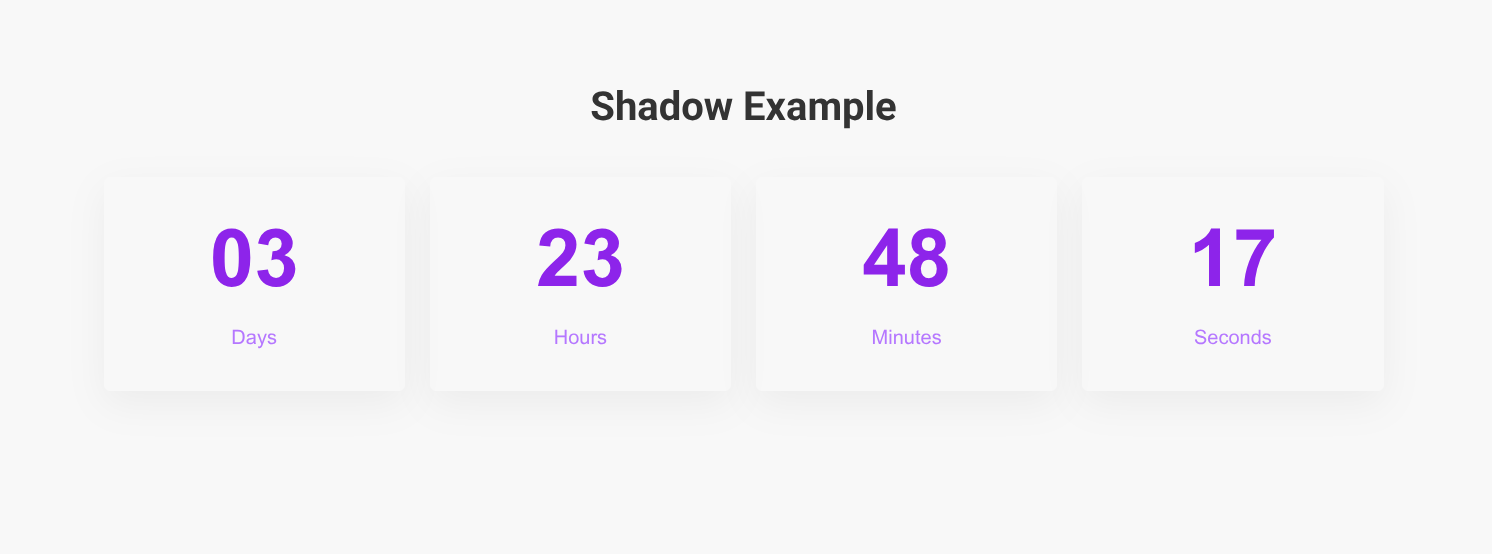
The plugin provides two distinct countdown widgets: a standard Countdown and a more advanced “Countdown Timer.” Both are fully responsive and allow you to choose from various skins, including Block, Line, and Circle styles. What makes Element Pack Pro unique is its deep level of customization; you can adjust the spacing, typography, and background colors of each time unit (days, hours, minutes, seconds) to fit your brand’s aesthetic perfectly.
Beyond just visuals, it offers advanced functionality like evergreen timers and fixed-date settings. You can also define specific actions for when the clock hits zero, such as hiding the timer, displaying a custom message, or redirecting the visitor to a new URL. This makes it an ideal choice for flash sales, maintenance pages, and product launches.
Top Features
- Multiple countdown widgets with advanced styling.
- Evergreen, fixed-date, and scheduled timers.
- Post-expiration actions: redirect, hide, or show messages.
- 2,700+ ready-made design blocks and templates.
- Live Copy-Paste functionality for instant design.
- Full customization for time units, labels, and colors.
- Seamless integration with WooCommerce product pages.
- Performance-focused widget manager to keep sites fast.
- High-end animations and “reveal” effects for timers.
Price:
Free version available. Premium starts at $49/year for a single site, with lifetime plans available from $99.
Sales Countdown Timer

The last name on our list is Sales Countdown Timer, a WooCommerce-focused plugin designed to increase sales by creating urgency and encouraging purchases. The plugin integrates with WooCommerce to display countdown timers and progress bars on product and archive pages for sale campaigns and promotions.
Sales Countdown Timer lets you display timers on single product pages, shop pages, and categories in WooCommerce. The clocks notify customers when sales will end or how many products are left in stock. The plugin allows you to schedule sales campaigns by date, hour, and minute and lets you select specific timer settings for single products, variations, or bulk products. You can also choose where the timers appear on product pages: before or after the price, near the sale badge, or next to the “Add to Cart” button. On archive pages, timers can be positioned in categories, shop listings, or related product sections.
The plugin also supports customizable upcoming sale messages, a sales progress bar to show stock levels and detailed post-expiration actions like hiding timers or redirecting users. For non-WooCommerce use, countdown timers can be displayed anywhere on your site using shortcodes. With its responsive design and multiple standalone timer profiles, Sales Countdown Timer is the perfect way to increase conversions and highlight your WooCommerce campaigns.

Top Features
- Countdown timers for WooCommerce sales.
- Flexible placement on product pages and archives.
- Schedule timers by date, hours, or minutes.
- Progress bars for stock or sales goals.
- Customizable upcoming sale and expiration messages.
- Shortcode support for non-WooCommerce timers.
- Multiple standalone timer profiles.
Price
Sales Countdown Timer is available for free, with the Pro version starting at $20 per year.
Conclusion
The plugins in this list were chosen for their unique features, ease of use, and ability to address different scenarios. E-commerce sites may benefit from WooCommerce integration and stock-based progress bars, while general websites can use customizable designs and shortcode compatibility.
To choose the right plugin, focus on your project’s goals, whether it’s enhancing sales, promoting events, or managing deadlines. This guide equips you with the tools to select the perfect countdown timer plugin for your website.

